¶ Discord Support
CubeDAO Discord server provides many text and voice channels where you can communicate with others, make new friends and learn more about the survival gamemode on The Cube.
While the discord is a great place to hangout with friends, the 'Support' channel, also enables you to contact staff directly to get any support that you need. This channel covers anything from questions to reporting bugs.
¶ Tickets
Tickets can be found on CubeDAO Forums under the section “Support” or by clicking this link https://cubedao.net/. Here you can report bugs, players, staff and issues.
Once a ticket has been opened, you should check back on it a few times a day, this is so you can answer any questions and also check to see if your issue has been resolved. Please be patient on any tickets you submit, replying to it asking for a quicker response will only make the process longer as it will change the prefix set on it.
¶ Providing Screenshot Evidence
When creating a support ticket or getting evidence for a player report in-game, screenshots and sometimes other ways of evidence (videos, GIFs, etc.) are needed.
While Staff can verify the authenticity of what has been reported, we kindly ask players to cooperate when reporting.
There are multiple ways you can screenshot and provide evidence to staff, from using the screenshot tool that Minecraft includes, downloading a program to screenshot, and turn them into links.
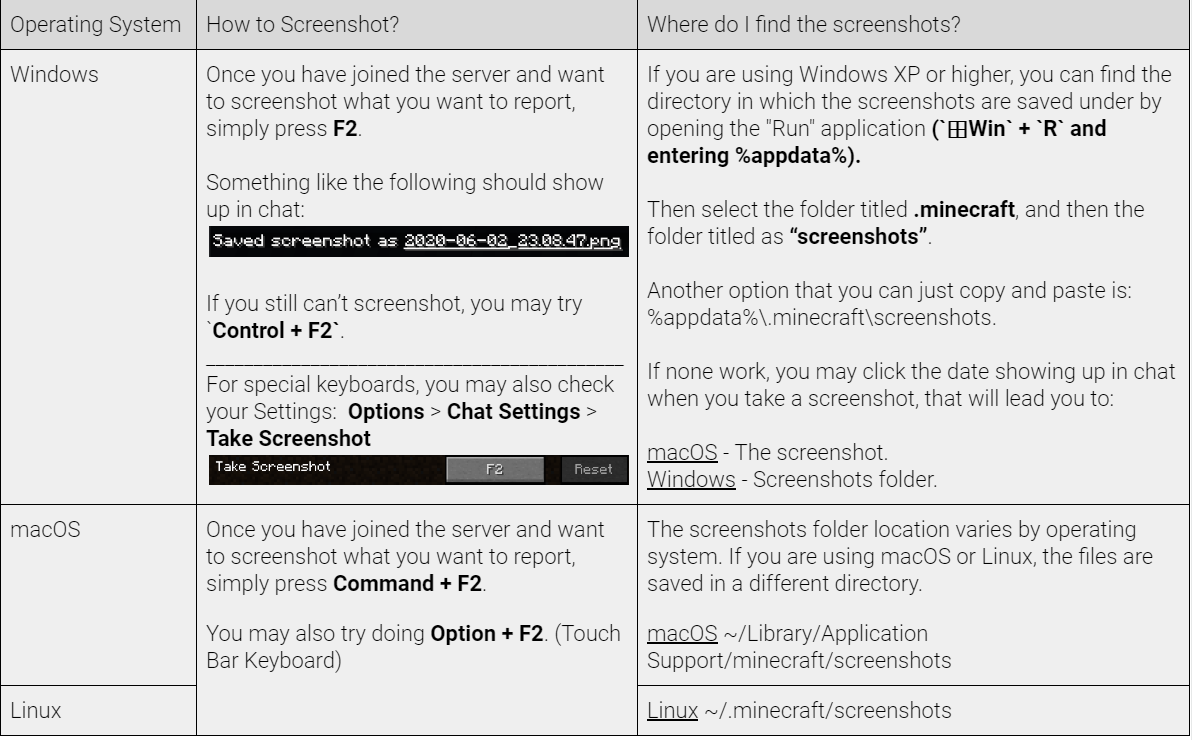
Below you will find explanations on how to take a snapshot using the built in Minecraft Screenshot Tool.
Minecraft Screenshot Tool